Passed all 10 tests
We check each wallet from its code to the app on your device, asking these questions in order:
The answer is "yes".
If the answer were "no", we would mark it as "Fake" and the following would apply:
The answer is "no". We marked it as "Fake".
We did not ask this question because we failed at a previous question.
If the answer were "no", we would mark it as "Fake" and the following would apply:
The bigger wallets often get imitated by scammers that abuse the reputation of the product by imitating its name, logo or both.
Imitating a competitor is a huge red flag and we urge you to not put any money into this product!
The answer is "yes".
If the answer were "no", we would mark it as "Announced but never delivered" and the following would apply:
The answer is "no". We marked it as "Announced but never delivered".
We did not ask this question because we failed at a previous question.
If the answer were "no", we would mark it as "Announced but never delivered" and the following would apply:
Some products are promoted with great fund raising, marketing and ICOs, to disappear from one day to the other a week later or they are one-man side projects that get refined for months or even years to still never materialize in an actual product. Regardless, those are projects we consider “vaporware”.
The answer is "yes".
If the answer were "no", we would mark it as "Un-Released" and the following would apply:
The answer is "no". We marked it as "Un-Released".
We did not ask this question because we failed at a previous question.
If the answer were "no", we would mark it as "Un-Released" and the following would apply:
We focus on products that have the biggest impact if things go wrong and while pre-sales sometimes reach many thousands to buy into promises that never materialize, the damage is limited and there would be little definite to be said about an unreleased product anyway.
If you find a product in this category that was released meanwhile, please contact us to do a proper review!
The answer is "yes".
If the answer were "no", we would mark it as "Not a wallet" and the following would apply:
The answer is "no". We marked it as "Not a wallet".
We did not ask this question because we failed at a previous question.
If the answer were "no", we would mark it as "Not a wallet" and the following would apply:
If it’s called “wallet” but is actually only a portfolio tracker, we don’t look any deeper, assuming it is not meant to control funds. What has no funds, can’t lose your coins. It might still leak your financial history!
If you can buy Bitcoins with this app but only into another wallet, it’s not a wallet itself.
The answer is "yes".
If the answer were "no", we would mark it as "A wallet but not for Bitcoin" and the following would apply:
The answer is "no". We marked it as "A wallet but not for Bitcoin".
We did not ask this question because we failed at a previous question.
If the answer were "no", we would mark it as "A wallet but not for Bitcoin" and the following would apply:
At this point we only look into wallets that at least also support BTC.
The answer is "yes".
If the answer were "no", we would mark it as "Provided private keys" and the following would apply:
The answer is "no". We marked it as "Provided private keys".
We did not ask this question because we failed at a previous question.
If the answer were "no", we would mark it as "Provided private keys" and the following would apply:
The best hardware wallet cannot guarantee that the provider deleted the keys if the private keys were put onto the device by them in the first place.
There is no way of knowing if the provider took a copy in the process. If they did, all funds controlled by those devices are potentially also under the control of the provider and could be moved out of the client’s control at any time at the provider’s discretion.
The product cannot be independently verified. If the provider puts your funds at risk on purpose or by accident, you will probably not know about the issue before people start losing money. If the provider is more criminally inclined he might have collected all the backups of all the wallets, ready to be emptied at the press of a button. The product might have a formidable track record but out of distress or change in management turns out to be evil from some point on, with nobody outside ever knowing before it is too late. The answer is "yes".
If the answer were "no", we would mark it as "Leaks Keys" and the following would apply:
The answer is "no". We marked it as "Leaks Keys".
We did not ask this question because we failed at a previous question.
If the answer were "no", we would mark it as "Leaks Keys" and the following would apply:
Some people claim their paper wallet is a hardware wallet. Others use RFID chips with the private keys on them. A very crucial drawback of those systems is that in order to send a transaction, the private key has to be brought onto a different system that doesn’t necessarily share all the desired aspects of a hardware wallet.
Paper wallets need to be printed, exposing the keys to the PC and the printer even before sending funds to it.
Simple RFID based devices can’t sign transactions - they share the keys with whoever asked to use them for whatever they please.
There are even products that are perfectly capable of working in an air-gapped fashion but they still expose the keys to connected devices.
This verdict is reserved for key leakage under normal operation and does not apply to devices where a hack is known to be possible with special hardware.
The product cannot be independently verified. If the provider puts your funds at risk on purpose or by accident, you will probably not know about the issue before people start losing money. If the provider is more criminally inclined he might have collected all the backups of all the wallets, ready to be emptied at the press of a button. The product might have a formidable track record but out of distress or change in management turns out to be evil from some point on, with nobody outside ever knowing before it is too late. The answer is "yes".
If the answer were "no", we would mark it as "Bad Interface" and the following would apply:
The answer is "no". We marked it as "Bad Interface".
We did not ask this question because we failed at a previous question.
If the answer were "no", we would mark it as "Bad Interface" and the following would apply:
These are devices that might generate secure private key material, outside the reach of the provider but that do not have the means to let the user verify transactions on the device itself. This verdict includes screen-less smart cards or USB-dongles.
The wallet lacks either a screen or buttons or both. In consequence, crucial elements of approving transactions is being delegated to other hardware such as a general purpose PC or phone which defeats the purpose of a hardware wallet. For big exit scams, a companion app could always request two signatures - one for the coffee you are paying and a second to empty your wallet completely. The former could be broadcast while the latter only gets collected for later use.
Another consquence of a missing screen is that the user is faced with the dilemma of either not making a backup or having to pass the backup through an insecure device for display or storage.
The software of the device might be perfect but this device cannot be recommended due to this fundamental flaw.
The product cannot be independently verified. If the provider puts your funds at risk on purpose or by accident, you will probably not know about the issue before people start losing money. If the provider is more criminally inclined he might have collected all the backups of all the wallets, ready to be emptied at the press of a button. The product might have a formidable track record but out of distress or change in management turns out to be evil from some point on, with nobody outside ever knowing before it is too late. The answer is "yes".
If the answer were "no", we would mark it as "No source for current release found" and the following would apply:
The answer is "no". We marked it as "No source for current release found".
We did not ask this question because we failed at a previous question.
If the answer were "no", we would mark it as "No source for current release found" and the following would apply:
A wallet that claims to not give the provider the means to steal the users’ funds might actually be lying. In the spirit of “Don’t trust - verify!” you don’t want to take the provider at his word, but trust that people hunting for fame and bug bounties could actually find flaws and back-doors in the wallet so the provider doesn’t dare to put these in.
Back-doors and flaws are frequently found in closed source products but some remain hidden for years. And even in open source security software there might be catastrophic flaws undiscovered for years.
An evil wallet provider would certainly prefer not to publish the code, as hiding it makes audits orders of magnitude harder.
For your security, you thus want the code to be available for review.
If the wallet provider doesn’t share up to date code, our analysis stops there as the wallet could steal your funds at any time, and there is no protection except the provider’s word.
“Up to date” strictly means that any instance of the product being updated without the source code being updated counts as closed source. This puts the burden on the provider to always first release the source code before releasing the product’s update. This paragraph is a clarification to our rules following a little poll.
We are not concerned about the license as long as it allows us to perform our analysis. For a security audit, it is not necessary that the provider allows others to use their code for a competing wallet. You should still prefer actual open source licenses as a competing wallet won’t use the code without giving it careful scrutiny.
The product cannot be independently verified. If the provider puts your funds at risk on purpose or by accident, you will probably not know about the issue before people start losing money. If the provider is more criminally inclined he might have collected all the backups of all the wallets, ready to be emptied at the press of a button. The product might have a formidable track record but out of distress or change in management turns out to be evil from some point on, with nobody outside ever knowing before it is too late.Build Verifications
Check your file
Application information
Background
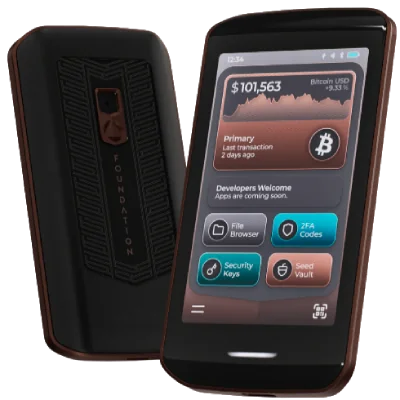
Foundation Passport Prime is the third generation of the Foundation Passport line, succeeding the

It is a distinct product from its predecessors: new hardware, new OS, Bluetooth connectivity, an NFC-card backup system, and an open app platform. It should not be treated as a firmware update to the Passport Gen 2.
Operating System
Passport Prime runs KeyOS, a Rust microkernel operating system built on Xous — an open-source microkernel originally developed by bunnie and xobs for the Precursor/Betrusted project. Apps run sandboxed and communicate by message passing. Each app receives a hardened child seed derived from the master seed; no app has direct access to the master key.
Foundation requires that all apps distributed through the KeyOS app catalog be open source and reproducible. Developers may also distribute apps directly to users outside the catalog.
Product Description
- Display: 3.5” color IPS touchscreen with Gorilla Glass
- Battery: 1100 mAh Li-ion (non-removable)
- Dimensions: 55.5 × 104.8 × 11 mm, 93 g
- Chassis: Anodized aluminum
- Security Processor: Microchip SAMA5D2
- Secure Element: Microchip 608c
- Connectivity: QuantumLink Bluetooth, NFC, USB-C (charging and data), QR camera
- Storage: 50 GB encrypted file storage
- Manufacturing: Assembled in the USA
- Price: $349
Beyond Bitcoin, Passport Prime supports 2FA/TOTP codes, FIDO2 security keys, multiple cryptocurrency seeds, BIP-39 passphrases, and encrypted file storage — all managed through KeyOS.
Bitcoin Wallet
Passport Prime generates a master key on the device during setup; users can back it up as BIP-39 seed words (Foundation FAQ).
The wallet supports standard Bitcoin self-custody via PSBTs. Compatible software wallets include Sparrow, BlueWallet, Nunchuk, Casa, and Theya, among others supporting PSBTs via QR codes (Foundation CEO announcement, March 2026). Multisig is supported.
The device communicates with the
 Envoy companion app over QuantumLink — a Bluetooth protocol in which messages are encrypted before reaching the Bluetooth chip, which is isolated on a dedicated hardware component.
Backup
Magic Backup (recommended) splits the master key into three parts using 2-of-3 Shamir Secret Sharing — any two are sufficient for recovery:
- Parts 1 & 2: written to two of the three NFC KeyCards included with the device
- Part 3: stored on the user’s phone via Envoy, then synced to iCloud Keychain (iOS) or Android Auto-Backup (Android)
In addition, encrypted wallet metadata and settings are continuously synced to Foundation’s servers, identified only by a SHA-256 hash of the master key. Foundation states it cannot access this data — only the holder of the master key can decrypt it (Foundation backup docs).
Foundation states it never stores or has access to any part of the private key. Users who prefer not to use cloud storage can opt for Manual Backup instead, using all three KeyCards or a standard BIP-39 seed word export.
Hierarchically Deterministic
All accounts and keys are derived from one masterseed as defined in BIP 32, BIP 39, BIP 44, BIP 49, BIP 84 and BIP 86. While some wallets might use different definitions and not all support SegWit or Taproot, we only consider this feature as given if
- the backup is a BIP 39 mnemonic
- the funds are recoverable on a competitor’s product correctly implementing those standards
- no address reuse
- simple backup
- no vendor lock-in
Why we list it for this wallet
BIP39 compliant seed word representation of the Prime Master Key.
Source: Foundation backup docs
Free and Open Source (FOSS)
The wallet’s source code is published under a license approved by the Open Source Initiative (OSI) — such as MIT, GPL, Apache, or AGPL — allowing anyone to inspect, modify, and redistribute it. This is a prerequisite for independent security audits and reproducible builds. Licenses that are merely “source available” but not OSI-approved (e.g., those with Commons Clause restrictions, commercial use prohibitions, or other non-free terms) do NOT qualify. Reproducible builds are not sufficient alone.
-
Transparency: Anyone can verify what the code does — including whether it contains backdoors, bugs, or privacy-violating behavior.
-
Community auditing: More reviewers means vulnerabilities are more likely to be found and fixed.
-
Forkability: If the project is abandoned or goes rogue, the community can fork and continue it.
FOSS alone does not guarantee security. The released binary must also be reproducible from the public source to ensure users are actually running the code that was audited.
Why we list it for this wallet
KeyOS is completely open source.
Secure Elements
Secure Elements in Bitcoin wallets refer to dedicated hardware components designed to enhance security. These elements are specialized circuits or chips embedded in the device, providing a fortified environment for storing sensitive data such as private keys. Unlike standard storage, Secure Elements are resistant to tampering and physical attacks, making them an ideal choice for safeguarding cryptographic data and operations. The use of Secure Elements is crucial, especially in hardware and mobile wallets, where the risk of physical theft or tampering is a concern. These elements can effectively shield private keys from a wide range of attacks, including sophisticated ones like side-channel attacks. They ensure that private keys never leave the secure environment, even when signing transactions, offering a higher level of security compared to software-only solutions. While adding a significant layer of security, Secure Elements may pose challenges in terms of wallet recovery. In cases where the device is damaged or lost, retrieving the private keys can be more complex compared to wallets that solely use software-based security measures.
- Enhanced security against physical and sophisticated attacks
- Increased protection for private keys and sensitive data
- Peace of mind knowing that cryptographic operations are performed in a secure, isolated environment
Potential complexities in wallet recovery and dependency on specific hardware.
Camera for Secure Transactions
Camera functionality in Bitcoin hardware wallets, represents a significant advancement in wallet security and data transmission. These wallets use their built-in cameras to scan QR codes, enabling a secure and efficient method for data exchange and transaction signing. The camera-based approach is integral to maintaining an air-gapped environment, meaning the wallet does not rely on potentially vulnerable USB or Bluetooth connections for communication. The process involves creating an unsigned transaction as a QR code using a compatible wallet app. This QR code is then scanned by the hardware wallet’s camera. Inside the wallet, the transaction is securely signed using the stored private key. The signed transaction is subsequently displayed as a new QR code on the wallet, which can then be scanned back by the app to broadcast it to the blockchain network. This method of using a camera for QR code scanning and transmission ensures that the private keys remain solely within the hardware wallet, significantly bolstering security against remote attacks. It also enhances privacy, as the wallet does not directly connect to the internet or other devices, thereby reducing exposure to potential vulnerabilities.
- Enhanced security by maintaining an air-gapped environment
- Increased privacy as the wallet does not directly connect to the internet
- User-friendly transaction process with QR code scanning
Why we list it for this wallet
Omnivision camera for QR scanning
Source: Passport Prime product page
NFC (Near Field Communication)
The wallet supports Near Field Communication (NFC) for wireless interaction with hardware wallets, payment terminals, or signing cards. NFC enables tap-to-sign or tap-to-pay functionality over a very short range (typically a few centimeters) without cables or QR codes.
- Convenience: Quick tap interaction — no cables to connect or QR codes to scan.
- Hardware wallet compatibility: Some hardware signing cards communicate exclusively via NFC.
- Requires NFC hardware on both devices.
- Very short range limits usability compared to QR-based air-gapped setups.
Why we list it for this wallet
Dedicated Bluetooth and NFC connectivity chips
Source: Passport Prime product page
Multi Signature
Bitcoin allows to define addresses controlled by more than one private key. Two-of-three for example would mean that any two of a list of three private keys would be required to send coins from this address.
With keys from distinct devices or users, an attacker would have to compromise multiple devices or users at once. Multi signature thus allows to protect against one device catching a virus, one wallet having a backdoor (if the multi signature works across different providers’ wallets), one hardware wallet not being trusted (if hardware wallets can be used for multi signature), etc.
- There are no good standards yet for multi signature accounts. This might mean that an account that works with one provider’s wallet won’t load in any other wallet which can complicate recovery should that wallet go out of business.
- Using Multi Signature results in bigger and thus more expensive transactions.
- Using Multi Signature accounts makes it easier for blockchain analysis companies to follow the trail of a wallet.
- Multi Signature accounts require backups of additional descriptors, making financial loss from user error more likely.
Custom Node Connection
The wallet can be configured to connect to a user-specified, independently operated Bitcoin node — such as Bitcoin Core, Electrum Server, or other compatible full node software — instead of the wallet provider’s default servers. The key requirement is that the node is clearly independent from the wallet vendor: a third-party node the user controls or trusts.
-
Privacy: Transaction queries go to your own node rather than a third-party server, so no provider learns your wallet addresses or balances.
-
Security: No risk of a provider lying about your balance or the state of the network.
-
Sovereignty: Full independence from wallet provider infrastructure.
- Requires running and maintaining your own Bitcoin node.
- More complex initial setup compared to using the provider’s default servers.
Why we list it for this wallet
Can I connect Envoy to my own Bitcoin node? Yes, Envoy connects using the Electrum server protocol.
Source: Foundation FAQ
Reproducibility
Firmware is distributed via KeyOS-Releases, built from KeyOS. The GitHub Release asset is named release.tar. The same binary also exists in the release repo branch under the descriptive name KeyOS-vX.Y.Z-to-vA.B.C-Update.tar (e.g. KeyOS-v1.2.0-to-v1.2.1-Update.tar) as a Git LFS object. For v1.2.1 we confirmed the two are identical in content and SHA-256; we have not repeated that check for every release. GitHub Release downloads also include a manifest.json with signed and unsigned SHA-256 fields (verified for v1.2.1).
That is how firmware reaches a device — it is not the subject of the automated verification. release.tar is a delta-update archive; what we verify are the individual firmware components it and the release branch deliver, as set out below.
Verification Scope
The source of truth for this device is Foundation-Devices/KeyOS, with published release artifacts in Foundation-Devices/KeyOS-Releases. KeyOS is the source side of this verification and is not treated as a separate wallet entry.
Automated verification covers the individual firmware components Foundation publishes for a release — 119 of them in each of the three releases we have verified. Those members are extracted from a firmware image built from source and compared one by one against Foundation’s published copies. The update package a device actually downloads (release.tar, also published in the release branch as KeyOS-vX.Y.Z-to-vA.B.C-Update.tar) updates selected installed components through delta actions; components it does not touch remain as they are or are delivered separately. Verifying that package end to end is a separate step, demonstrated once by hand but not yet part of the automated run.
WalletScrutiny has completed reproducibility verifications for v1.2.1, v1.3.0 and v1.3.1, each scoped to the components described below.
Notes on Firmware Verification
Foundation publishes the source for KeyOS and documents how to rebuild it, so this device can be checked rather than taken on trust. Reproducibility results are easy to over-read, though, so the sections below set out in ordinary language exactly what the check covers, what it does not, and where the remaining gaps are.
What we are testing
We rebuild the firmware ourselves from Foundation’s published source, then compare what we produced against what Foundation published.
All three releases produced the same 119 of 119 result, but the safeguards around that result grew stricter over time. The v1.2.1 run made the component comparisons themselves. v1.3.0 added reverse inventory closure, which detected in-scope release files absent from the build and required every release path to be classified. v1.3.1 added cryptographic authentication of Foundation’s signatures, resolved the release files to a single commit, and made an unrecognized path stop the run outright. What follows describes the check as it stands today, noting the release each safeguard arrived in; the linked reports record exactly which controls applied to each run.
The build. Foundation ships a build definition in which the declared toolchain and dependencies are pinned to fixed versions. We run their build commands using only their public source, inside a container whose base image is — from v1.3.1 — pinned by content hash. Where those pins hold, the rebuilt payloads should match the released ones.
The comparison. The firmware is not one file. It is a small operating system assembled from many parts, and we check 119 of them individually:
- 11 compiled payloads — the core system image, the recovery image, and nine application binaries, all rebuilt from source. KeyOS keeps applications as separate signed programs rather than one blob, so the Bitcoin wallet and the Seed Vault — the code that handles keys and transactions — are each checked in their own right.
- 108 source-derived files — the permission manifests that assign each application its capabilities, plus fonts, icons and screen assets. These are generated or copied from source during the build rather than compiled, and are compared whole-file.
That same 11 + 108 split has held for every release we have verified — 119 of 119 matched, none mismatched and none missing, in v1.2.1, v1.3.0 and v1.3.1 alike. A future release may ship a different number: the count is read from the build, not assumed.
The permission manifests are security-relevant because they assign application capabilities. A swapped manifest can grant an otherwise unchanged application new powers, and a check that looked only at compiled code would not see it.
Signatures. Foundation wraps each signed component in a 2,048-byte signing envelope. Beginning with v1.3.1, we verify that envelope cryptographically for every signed component, using Foundation’s own cosign2 tool, and require two different signing keys, both listed in the KNOWN_SIGNERS table published in the KeyOS source. Only after that check passes do we strip the envelope and compare the payload underneath. In the earlier runs the envelope was stripped without authenticating it, so those comparisons rest on the payload match alone. Our rebuild cannot reproduce that envelope in any case: we do not hold the private keys corresponding to the production signatures, and the signed metadata it carries — including build date — may differ. (The OTA update package carries a single signature rather than two; the two-key requirement applies to the signed compiled components.)
Nothing unaccounted for. We take the complete file listing of the release and classify every path in it. Each in-scope component must have a counterpart in our rebuild. Composite and update artifacts are recorded as deliberately out of scope. From v1.3.0 the listing is also read in the opposite direction, so that a file Foundation published but we never examined is caught rather than passed over. In that run, an unrecognized release path triggered a human review before publication. From v1.3.1, it stops the run automatically — if Foundation ships something new, we would rather produce no verdict than a verdict that quietly skipped it.
Pinning. From v1.3.1, the release files we compare against, and the listing we check them for completeness against, are both resolved once to a single commit before the build begins, so nothing can change underneath a run that takes one to two hours. The earlier runs read those files from a branch that could in principle have moved mid-run.
The bootloader remains outside the verdict. It is the small program that starts everything else. The hash the device shows for it is deliberately normalized: before KeyOS starts, the bootloader replaces its secret entropy value with the same public default an ordinary rebuild uses. A hash displayed on a device and the hash of a matching plaintext bootloader image are therefore directly comparable — the mechanism is sound, and the device is not withholding anything here.
What is missing is a matching pair to compare. Foundation publishes a plaintext bootloader image for v1.0.0, but no public KeyOS source for v1.0.0 exists. For v1.2.0 through v1.3.1 the source is public, but the release repository publishes only encrypted bootloader files. No published version currently supplies both public source and a public plaintext comparand. WalletScrutiny therefore cannot complete the comparison from published materials alone.
In July 2026 Foundation posted a photograph of a production device showing bootloader 0.2.1, build date 11 March 2026, and its normalized hash. That date precedes the oldest public KeyOS commit, from 12 March 2026, so the unit was running a factory bootloader whose source was never published. Our earlier rebuild of the v1.2.1 bootloader was therefore not a matching comparand, and the difference between the two hashes is not evidence that the shipped bootloader was built inconsistently.
Foundation’s build already prints the normalized plaintext hash it produces. Publishing that hash for each publicly sourced bootloader build would provide an authoritative comparand for owners running the same build. Until WalletScrutiny can connect a publicly sourced build to a matching production-device hash, the bootloader stays outside the verdict.
What the signature check does and does not prove. The trusted keys we check against are published in Foundation’s own source code. So a passing check confirms the released files are validly signed under the keys KeyOS itself declares — it does not independently establish that those keys belong to Foundation. That would require obtaining them from a source Foundation does not control.
Not covered by the automated verification: the bootloader; the update package described below; Foundation’s Factory.img (its contents were compared by hand for v1.2.1, but the automated run does not treat that image as an artifact or give it a verdict of its own); the pre-packaged bundles on the GitHub releases page; and the Bluetooth and secure-element firmware. Those last two are separate components built for separate targets. The Bluetooth firmware has published source of its own in prime-ble-firmware, so it could be brought into scope later; the ATECC608c is a Microchip secure element whose internal firmware Foundation does not publish and did not write. Neither was tested here.
What actually gets on your device
There is a gap between what the automated check covers and what you install, and it is worth stating precisely.
What your Passport Prime downloads is release.tar: a signed delta-update archive. Rather than a complete replacement for every file, it contains an action manifest plus a set of patches — instructions of the form “take the file you already have, change these bytes, and you will have the new one” — which the device uses to reconstruct the target files.
The automated verification covers the components, each matching its counterpart in the release files used as comparands for that run. It does not yet cover the archive those components are delivered in.
Its contents can be checked by applying each patch and reconciling the before-and-after inventories. Each patch begins with a 216-byte header recording the old and new versions, their sizes and their SHA-256 hashes, followed by bzip2-compressed qbsdiff patch data. The old hash confirms you are starting from the right file before patching; the new hash confirms the output is correct after. A complete check would also verify the archive’s outer signature before trusting anything inside it, and reconcile the full before-and-after inventories so that every file of the new version is accounted for as patched, left unchanged, delivered separately, or explicitly out of scope. An action manifest is not expected to list every file — the v1.2.1 one listed 11 — so completeness has to be judged against the inventories, not the manifest alone.
We have done this once by hand, for the v1.2.0 to v1.2.1 update: all 11 patches, applied to Foundation’s official v1.2.0 files, produced Foundation’s official v1.2.1 files byte for byte. This was a one-off manual experiment rather than part of the automated verifier, and its transcript has not been published, so it supports the endpoints of those patches rather than standing as evidence a reader can re-check. It is not a complete source-to-device chain, because the v1.2.0 files it started from were Foundation’s published copies rather than a build we had verified ourselves. Establishing an independently verified starting point is a major remaining gap, though not the only one: a finished check would also verify the archive’s outer signature under an independently authenticated key, confirm the action manifest is complete, and run automatically for every release. That is why this step is described as demonstrated rather than finished.
So, in short: a passing result here means the in-scope components of that firmware release matched the release files used as comparands for that run — payloads compared after signature-envelope removal for compiled payloads, whole-file for manifests and assets. It does not mean the delta-update archive your device downloads has been checked end to end, and it does not cover the bootloader or the separate Bluetooth and secure-element firmware.
This device is source-available.
Product page updated by Daniel Andrei R. Garcia
Community Opinions
These comments are contributed by Nostr users.
Loading opinions…
Do your own research
In addition to reading our analysis, it is important to do your own checks. Before transferring any bitcoin to your wallet, look up reviews for the wallet you want to use. They should be easy to find. If they aren't, that itself is a reason to be extra careful.